Register an OAuth 2.0 Lion Smart API Client
Organizations can register their application clients through the Lion Smart web app interface. The registration process will generate a unique Client ID and Client Secret, which are required for obtaining access tokens. Access tokens must be included in all API requests made by client applications. The Client Secret should be securely stored immediately, as it cannon be retrieved after registration.
Steps to register an API Client:
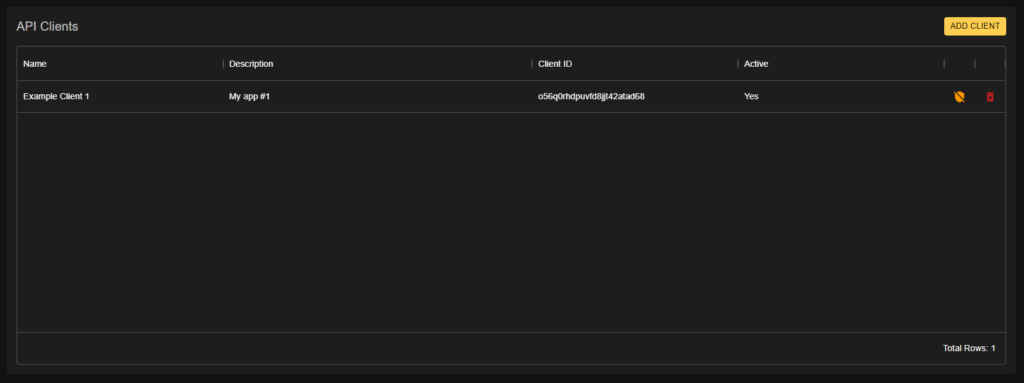
- Navigate to the Company Information page in the Lion Smart web app
- Select the API Client option from the menu.
- Click Add Client
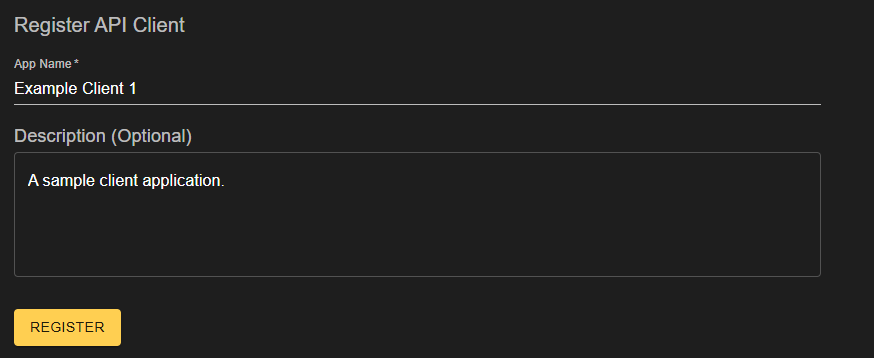
- Enter the name of the client applications and provide an optional description.
- Click Register
- Save the Client ID and Client Secret to a secure location. Note that the Client Secret is non-recoverable.

Obtaining an access token
Access tokens are issued by sending a POST request to the token issuer endpoint, including the Client ID and Client Secret in the request body. The response will contain an access token, which expires 1 hour after its issued. This token is necessary for accessing protected endpoints of the Lion Smart API.
Steps to Obtain an Access Token:
- Make a POST request to the token issuer endpoint.
- Include the Client ID and Client Secret in the request body.
- Extract the access token from the response.
POST /clients/token
// Example Request curl -X POST \
  'https://lion-api.lionenergy.com/clients/token' \
  -H 'Content-Type: application/json' \
  -d '{"client_id": "<CLIENT ID>", "secret_key": "<SECRET>"}'
// Example Token Response
{
"access_token": "<TOKEN>",
"expires_in": 3600, // 1 hour
"token_type": "Bearer"
}
Making an API Request
To authenticate a client, include the access token in the request headers of all subsequent API calls. A successful request to the test endpoint will return a confirmation message indicating that the token is valid.
GET /clients/auth/test
// Example Request curl -X GET 'https://lion-api.lionenergy.com/clients/auth/test' \
  -H 'Content-Type: application/json' \
  -H 'Authorization: Bearer <YOUR TOKEN>'
Managing API Clients
All API clients associated with an organization can be managed with the Lion Smart web app. Company administrators have the ability to delete, deactivate, or replace API clients as necessary, To access or modify API client information, users must have appropriate permissions. For any issues related to managing API clients, please contact the account administrator or reach out to Lion Energy Support.